AUTUMN & WINTER HEATING
Heating times
Morning7am – 9am
Afternoon & evening4pm – midnight
These times apply to the autumn and winter schedule. Contact Property Genius if you need help with the heating.
 Property GeniusResident information0161 881 3028
YOUR PROPERTY GUIDE
Everything for your home, in one place. Choose a section below.
 Your property manager: Lyn Hollowell
AT 18 ECCLES OLD ROAD
Page last updated:
AUTUMN & WINTER HEATING
These times apply to the autumn and winter schedule. Contact Property Genius if you need help with the heating.
SHARED LAUNDRY
Please do not use the laundry room after 10pm. Noise and vibration from the machines can disturb neighbouring residents.
Plan your cycle to finish before 10pm and collect washing promptly.
CYCLE STORAGE
Please store bicycles in the cycle racks in the car park. Keep communal hallways, stairs and exits clear.
BINS & RECYCLING
Use the bins provided and follow their labels. Keep lids closed and do not leave bags or bulky items beside the bins.
Salford recycling guidance
Find council bin-collection information
NO SMOKING
Please do not smoke anywhere inside, including bedrooms and communal areas. If you smoke outside, keep away from open doors and windows and dispose of cigarette ends responsibly.
BUILDING SECURITY
Please refer to the CCTV signs at the property for details. For questions about the cameras or how recordings are used, contact Lyn Hollowell.
Keep music, calls and conversations at a considerate volume, especially at night and early in the morning. Ask your visitors to do the same. Meet them at the door and make sure the entrance closes securely behind you.
Clean up after cooking, wipe surfaces and deal with spills promptly. Leave shared areas ready for the next person, and store personal items in your allocated space.
Keep hallways, stairs and exits clear. Never wedge fire doors open or interfere with their closers. Do not cover, disconnect or tamper with alarms.
Report a faulty alarm, damaged fire door or blocked exit promptly by calling 0161 881 3028. For fire or immediate danger, call 999.
Read the fire action notice in your building for its evacuation procedure and assembly point.
REPAIRS & MAINTENANCE
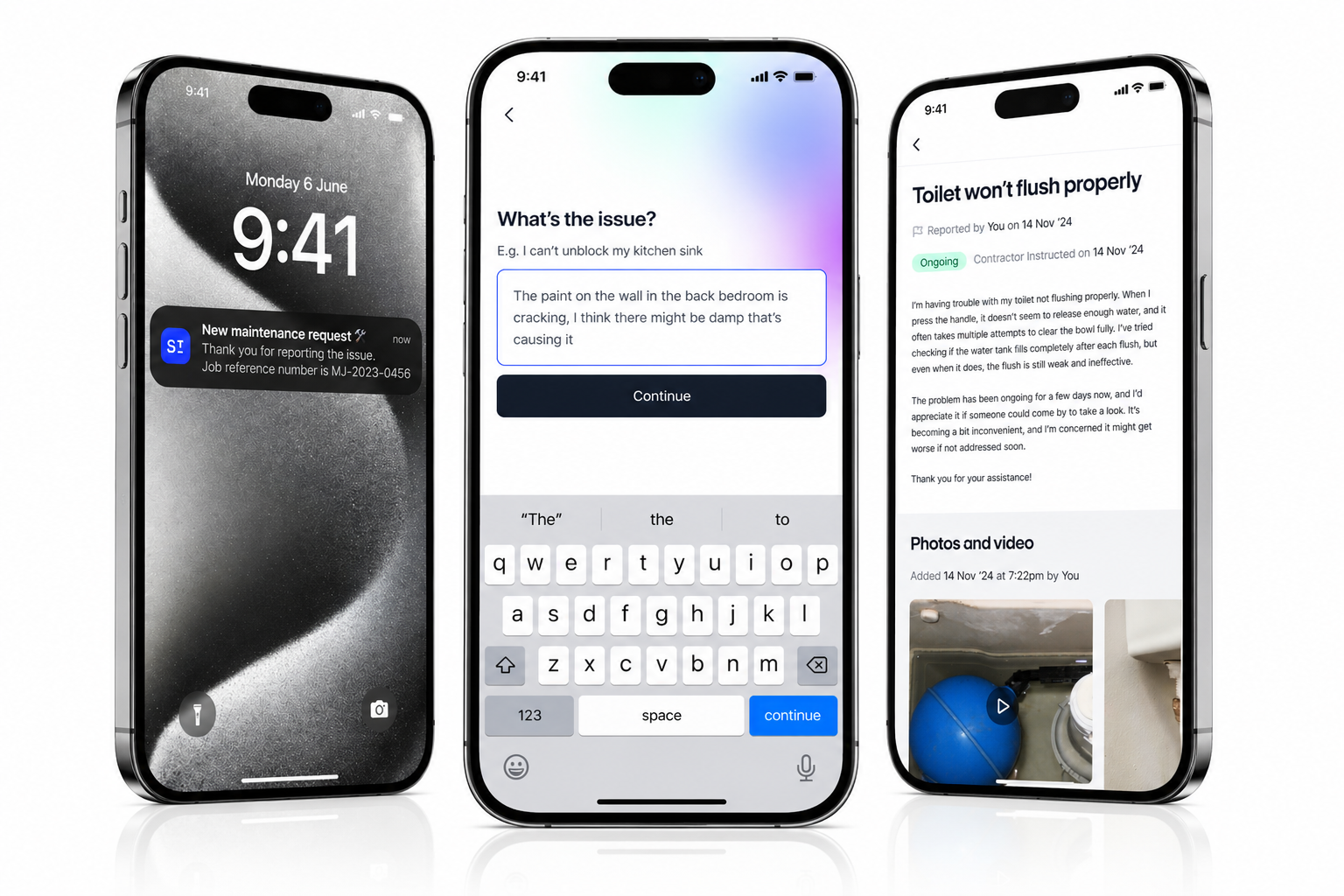
Report routine maintenance through the Street app. Keep the details, photos and progress together in one place.
Use the email address you have registered with Property Genius.
Open maintenance and start a new report. Include the room or shared area, when the problem started and photos or a short video if safe.
Report one issue at a time. Check the app for progress and requests for more information.
Cannot access the app? Call us for help.
EMERGENCY HELP
Call from a safe place. Follow the fire instructions displayed in your building.
National Gas Emergency Service. Avoid flames and electrical switches. Leave the building and call from outside, away from the suspected leak.
For a problem that cannot safely wait until the office reopens, such as a serious water leak or an external door that will not secure.
Tell us your address, room number and what has happened. Do not wait for an app reply.
VIRGIN MEDIA BROADBAND
Choose one of the networks below in your device’s Wi-Fi settings. Passwords are case-sensitive; each pair of networks uses the same password.
VM281A88VM581A80u2czpyQchpkZVM291C38VM591C30hB6fusqgwt3gDetails supplied in the property’s Wi-Fi record dated 15 August 2022. If the network names or passwords no longer work, contact Lyn to check the current details.
Switch your device’s Wi-Fi off and on, then reconnect. If possible, try another device and check whether other residents are affected.
If the router is safely accessible and you know which one serves your connection, let other users know before switching its power off and back on. Allow it to finish restarting before testing again. Leave its cables connected. If you are unsure, contact Lyn.
If the fault continues, call 0800 052 0800 and choose the fault-reporting option. Explain that the service is at 18 Eccles Old Road and describe the fault and router lights. Have the affected router’s CM MAC number available from its label.
If Virgin needs account-holder details or authorisation, contact Lyn rather than guessing security answers. Ask for a fault reference and pass it to her.
Log the ongoing fault in the Street app, including the network name, when the problem began, who is affected and any Virgin fault reference. If you cannot get online, call Lyn on 07537 159 176.
Do not press the pinhole reset button or change router settings unless Virgin Media or Property Genius directs you to. A factory reset can erase the existing configuration.
PROPERTY UPDATES
No dated updates have been added to this page yet. Please continue to check the notice board in the building for planned visits and temporary arrangements.
PROPERTY RECORDS
View the safety documents for your building and the dates recorded in them.
| Certificate | Issued / inspected | Next date | Notes | Document |
|---|---|---|---|---|
| Gas safetyGas Safety Certificate (CP12) | 7 July 2026Issued | 6 July 2027Expiry date | Expiry date as stated on the certificate. | View PDF |
| Fire detection & alarm systemInspection and servicing report | 3 February 2026Inspected / serviced | 3 August 2026Recommended next service by | Calculated from the report’s six-month maximum interval. This date has passed; a newer service record is awaiting confirmation. | View PDF |
| Emergency lightingExisting site verification certificate | 4 August 2026Inspected | To be confirmedNext test | The supplied certificate does not state the next test date. | View PDF |
For questions about these records or upcoming visits, contact Lyn Hollowell.
YOUR PROPERTY MANAGER
Property Genius
Property Genius Ltd
424 Barlow Moor Road
Manchester, M21 8AD
Urgent problem outside office hours?
Call 0161 881 3028.